*** How To Download ***
File #1 - MSSQL Server 2008 R2 Express
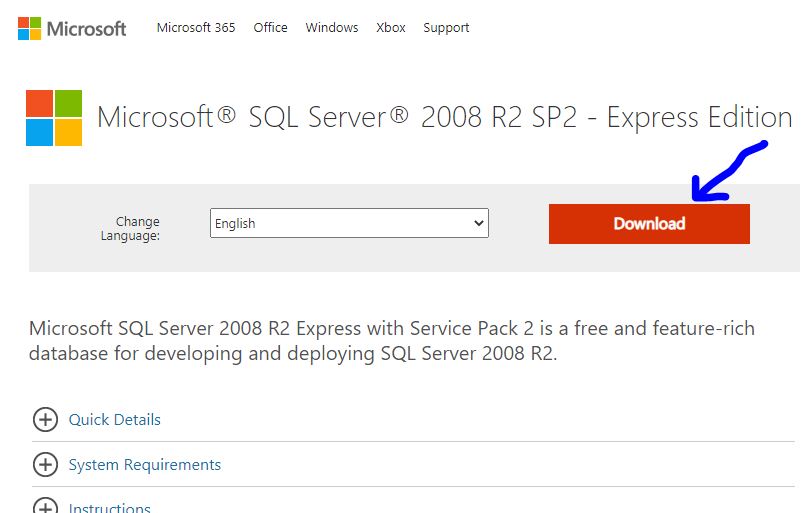
(Step 1) Copy and paste the link to your Google Chrome Browser or click the button below
https://www.microsoft.com/en-ph/download/details.aspx?id=30438
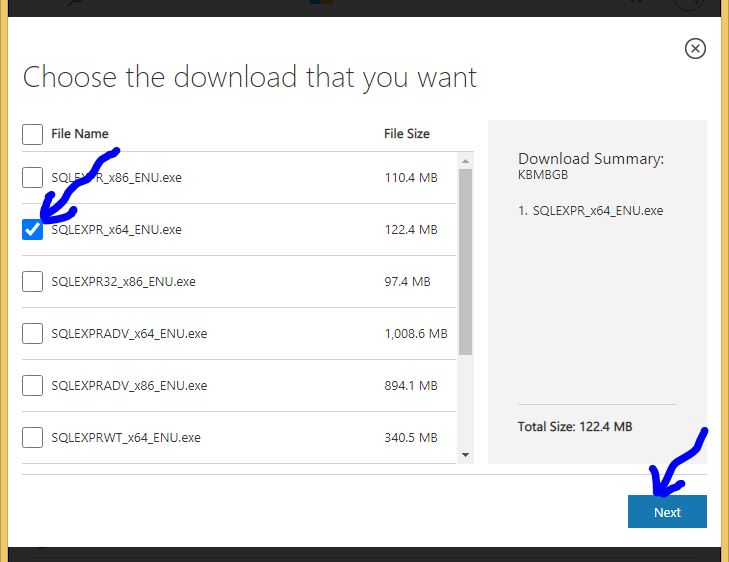
(Step 2) Select the file (Choose file with 64bit) and click NEXT
File #2 - MSSQL Server Management Studio (Note: Only 1 file needed. For win10 and up, please select version 18)
(Step 1) Copy and paste the link to your Google Chrome Browser or click the button below
SQL Server Management Studio 18
https://download.microsoft.com/download/f/e/b/feb0e6be-21ce-4f98-abee-d74065e32d0a/SSMS-Setup-ENU.exe
SQL Server Management Studio 17
https://download.microsoft.com/download/D/D/4/DD495084-ADA7-4827-ADD3-FC566EC05B90/SSMS-Setup-ENU.exe
SQL Server Management Studio 16
https://download.microsoft.com/download/9/3/3/933EA6DD-58C5-4B78-8BEC-2DF389C72BE0/SSMS-Setup-ENU.exe
File #3, #4, #5 - JRE, dist.zip, wowaidERP.zip
(Step 1) Copy and paste the link to your Google Chrome Browser or click the button below
Download JRE file for 64Bit
https://drive.google.com/file/d/1-KTPOEYp0Cc6x9seyRB-RS7U35UqqRt8/view?usp=sharing
(Step 3) Copy and paste the link to your Google Chrome Browser or click the button below to download C19 Database (wowaidERP.zip)
https://drive.google.com/file/d/1EZbTSRB72w3M9up7ZAM_lyykyzTcOQDS/view?usp=sharing
(Step 4) Copy and paste the link to your Google Chrome Browser or click the button below to download C19 Application (dist.zip)
https://drive.google.com/file/d/1iU1LtlTMWU6wJPvEg6E1AxhdoRHZmLLM/view?usp=sharing